


What Really Affects Video Turnaround Time
One of the most common questions we hear is:
“How long will this video take?”
One of the most common questions we hear is:
“How long will this video take?”
Short answer: it depends.
Long answer: it depends on several things, and they’re not always obvious.
Long answer: it depends on several things, and they’re not always obvious.
Whether you’re planning a short social clip or a full-length explainer, these are the six key things that make a difference:
1. Type of Video
Not all videos are created equal.
Not all videos are created equal.
A simple talking-head video takes much less time than an animated explainer with music, subtitles, and custom graphics. Some videos need scripts, storyboards, motion design, or screen recordings — others don’t. The more elements involved, the more time it takes.
Want help choosing the right type?
2. Video Length
It’s not just about how many minutes — it’s about how much content.
It’s not just about how many minutes — it’s about how much content.
A simple 15-second video might be done in a day. But two minutes of footage with voiceover, music, and titles? That takes longer to build, sync, review, and polish.
This is especially true for motion graphics. Animating 20 seconds of text and icons might be straightforward, but animating two full minutes with transitions, synced VO, and scene changes is a whole different beast. The longer the video, the more frames to design, animate, fine-tune, process, and export — and that adds up quickly.
3. Complexity of the Edit
Even short videos can take time if they’re complex.
Even short videos can take time if they’re complex.
For example:
Is there a lot of cutting between shots?
Are we adding fancy transitions, VFX, or motion overlays?
Are we syncing visuals to voiceover or music?
Is there color correction, subtitles, or design-heavy elements?
Will there be multiple versions of the video (different formats, languages, intros/outros, logos, or CTAs)? Each one adds time to adjust, export, and review.
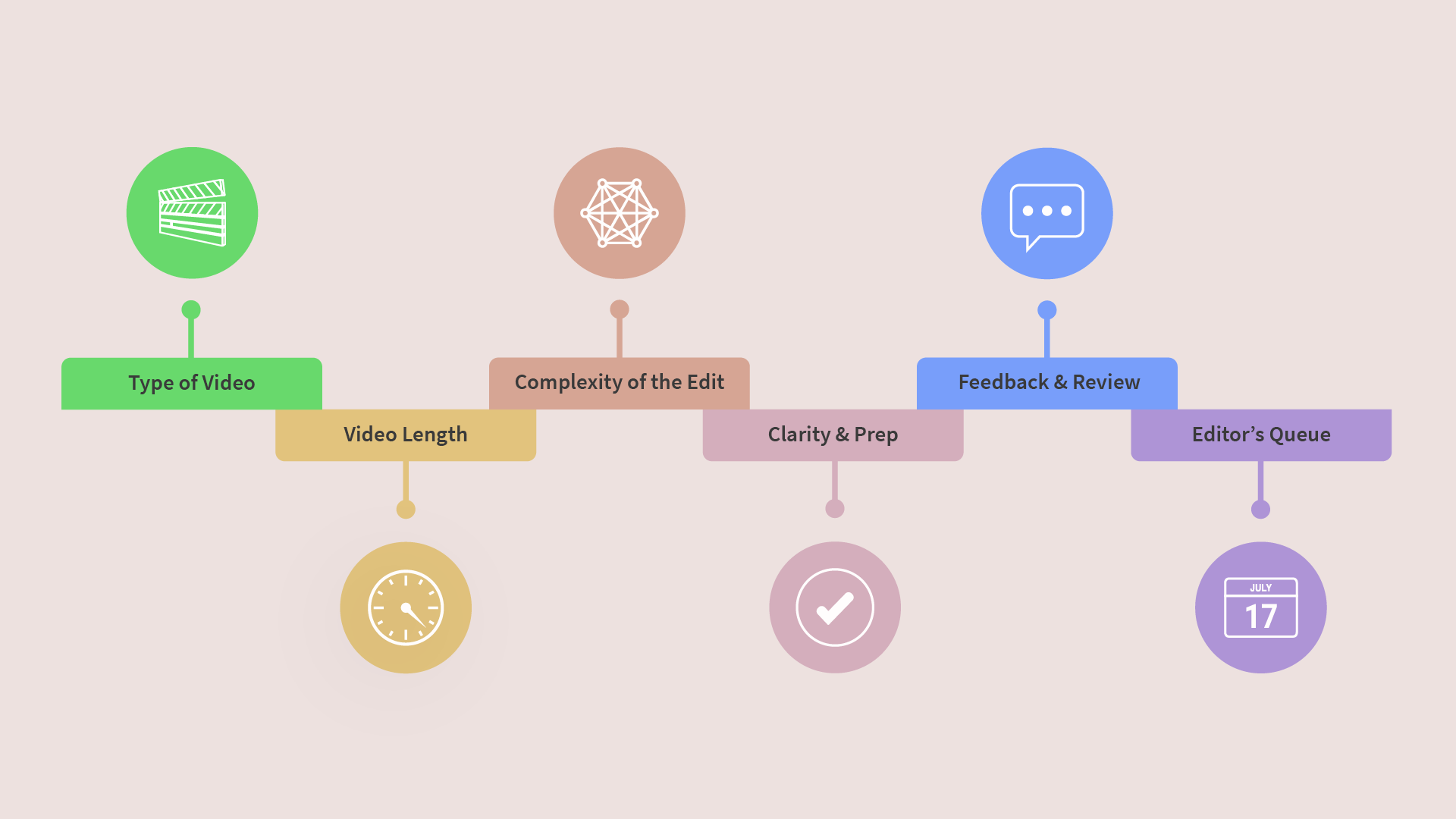
4. Clarity & Prep
When everything is ready from the start, the process flows.
If your team provides the footage, brand assets, script, voiceover, and music up front, your editor can begin right away.
But if assets are missing, decisions are still pending, or the goals are vague, expect delays.
When everything is ready from the start, the process flows.
If your team provides the footage, brand assets, script, voiceover, and music up front, your editor can begin right away.
But if assets are missing, decisions are still pending, or the goals are vague, expect delays.
Also, the quality of the source materials plays a role.
If the footage has bad audio that needs cleaning, or clips are out of sync, or assets (like logos or screenshots) are in the wrong format, your editor will need to fix that first. These extra steps might seem small, but they can add hours or days, depending on the fix.
If the footage has bad audio that needs cleaning, or clips are out of sync, or assets (like logos or screenshots) are in the wrong format, your editor will need to fix that first. These extra steps might seem small, but they can add hours or days, depending on the fix.
Want to see what steps go into editing?
5. Feedback & Review
This is where timelines can stretch — a lot.
This is where timelines can stretch — a lot.
A single, consolidated round of notes? Easy.
Five rounds of scattered feedback from multiple teams? That can add days — or weeks — and yes, it increases the cost too.
Also, some changes take more time than others.
Asking for a few trims is quick. But re-syncing a voiceover? That doubles the time. Big fixes or last-minute changes almost always mean going back into the timeline and rebuilding sections, not just dragging a clip over.
Tip: Group feedback. Be clear and aligned internally before sending notes.
6. Editor’s Queue
Freelancers, agencies, and even in-house editors juggle multiple projects.
Freelancers, agencies, and even in-house editors juggle multiple projects.
Unless you’ve booked a slot, you may need to wait a few days just to start. If you’re on a tight schedule, plan ahead and confirm availability, especially for larger or urgent projects.
Tips to Keep It Smooth
Decide on format, script, and VO early.
Be clear about the tone and goals.
Gather all materials before the edit begins.
Batch feedback — avoid piecemeal notes.
Let your editor know if you’re on a deadline.
And of course, experience matters. A seasoned editor can work faster, anticipate issues, and streamline the process, while someone newer might take longer to get the same results.
Tips to Keep It Smooth
Decide on format, script, and VO early.
Decide on format, script, and VO early.
Be clear about the tone and goals.
Gather all materials before the edit begins.
Batch feedback — avoid piecemeal notes.
Let your editor know if you’re on a deadline.
Here’s a rough estimate of how long different types of videos might take, assuming everything’s ready and feedback is smooth.
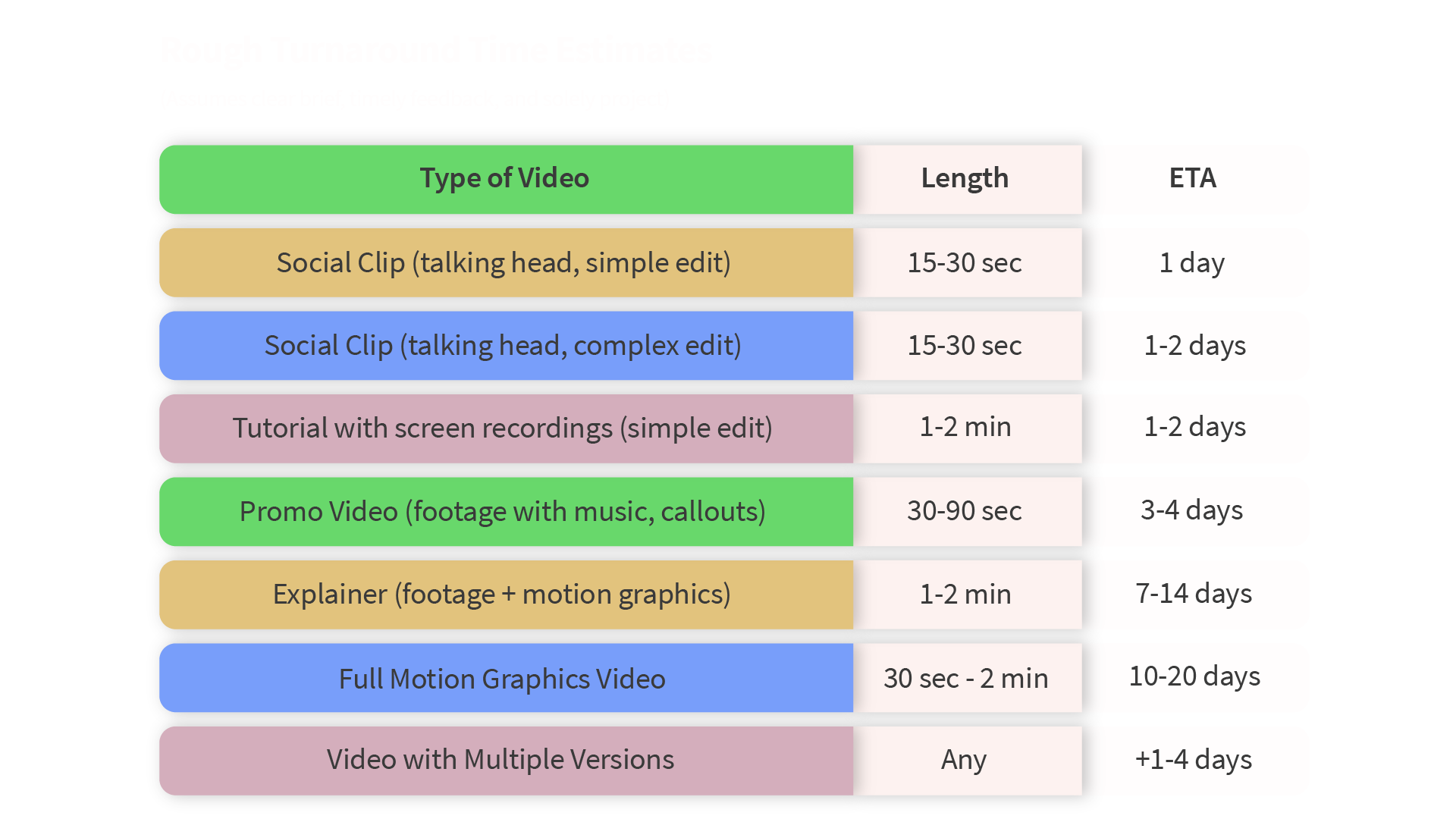
These are estimated turnaround times. Actual delivery may vary based on
project complexity, feedback rounds, team availability, and other factors.
Note:
Add more time if:
Add more time if:
- You need scripting, storyboarding, VO, or subtitles
- You expect multiple feedback rounds
- You haven’t pre-booked an editor or team
Video editing isn’t instant, but when everyone knows what to expect and comes prepared, the process is faster, cheaper, and more effective. Turnaround time is never set in stone — it’s always an estimate, shaped by all the factors above.
Grab the PDF version for a quick recap